
How to Fetch Data in C# .NET Core
But before anything we will setup our environment using visual studio here is a quick guide.
Feel free to look at this tutorial.
Great we will now create our solution, which will have a name of PokeApp, and a project which will be a Console app named PokeApi.
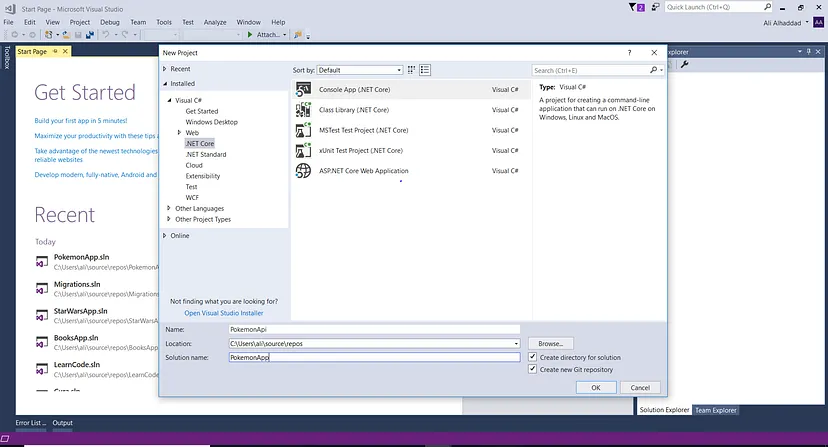
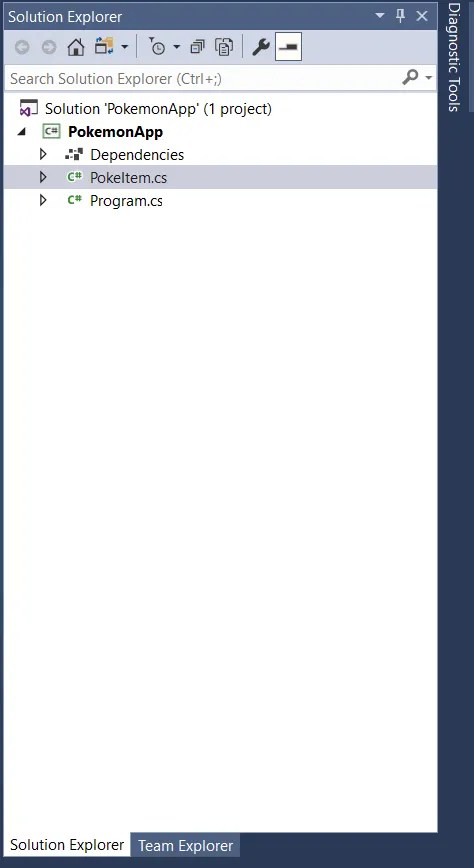
Now we will have a Program.cs which will be our main program file. Now we will have another file called PokeItem.cs which would be the structure of each PokeItem in our list.
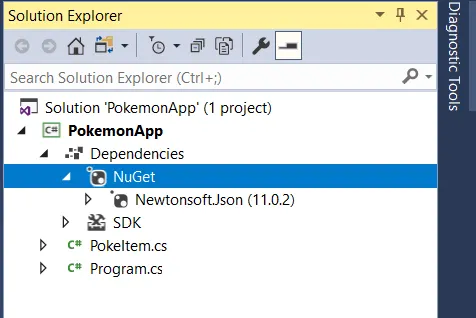
Now add your Nuget packages needed for your project. Add Newtonsoft which is the most popular nuget package. Used for parsing json to c# objects. By right clicking dependencies, and manage nuget packages. It should look like this, after adding it.
Now let’s start doing some code.
We will first define our PokeItem.cs file which would be used when we do a api call to just retrieve one pokemon. It is a very basic class with one property, and a constructor method, with the constructor setting it’s name property based on name argument.
using System;
using System.Collections.Generic;
using System.Text;

//Define your PokeItem model which will have a Name, and a Url.
namespace PokemonApp
{
    //Make your class public, since by default it is internal.
    public class PokeItem
    {
        //Define the constructor of your PokeItem which is the same name as class, and is not returning anything.
        //Will take a string name, and url as a argument.
        public PokeItem(string name, string url)
        {
            Name = name;
        }
        //Your Properties are auto-implemented.
        public string Name { get; set; }
    }
}
Feel free to look at github gist if you would like to look at the code.
Now we will go to our Program.cs file, where we will have a Newtonsoft.Json directive for converting data retrieved data from api to c# objects, and System.Net.Http to use your HttpClient which is the base client for retrieving a response using a uri.
//Using System.Net.Http directive which will enable HttpClient.
using System.Net.Http;
//use newtonsoft to convert json to c# objects.
using Newtonsoft.Json.Linq;
Feel free to look at github gist if you would like to look at the code.
Now we will define a static asynchronous method that will return nothing, but instead logs into a console.
Our using directive will be in a try/catch block.
We will then define our baseUrl within our method which will be the uri that our HttpClient will be connected to.
Then we will have a nested using directive, since it implements the IDisposable interface which has a garbage collector that will collect a object if unused.
We will have three using directives.
The first using directive we will have our HttpClient defined, which will assigned to client. If a exception is caught log it to console.
This will be in the Program.cs file.
//Now define your asynchronous method which will retrieve all your pokemon.
public static async void GetPokemon()
{
    //Define your baseUrl
    string baseUrl = "http://pokeapi.co/api/v2/pokemon/";
    //Have your using statements within a try/catch blokc that will catch any exceptions.
    try
    {
        //We will now define your HttpClient with your first using statement which will use a IDisposable.
        using (HttpClient client = new HttpClient())
        {

        }
    } catch(Exception exception)
    {
        Console.WriteLine("Exception Hit------------");
        Console.WriteLine(exception);
    }
}
Feel free to look at github gist if you would like to look at the code.
Now define your response which will be retrieving from the HttpClient response which would be HttpResponseMessage, which would return a message with status code and data from response. For this operation we would use the await keyword for our get request(since it is asynchronous). Which will also nest another using directive which would retrieve the content from the response, by assigning to a variable from the response Content property containing your data.
//Now define your asynchronous method which will retrieve all your pokemon.
public static async void GetPokemon()
{
    //Define your baseUrl
    string baseUrl = "http://pokeapi.co/api/v2/pokemon/";
    //Have your using statements within a try/catch block
    try
    {
        //We will now define your HttpClient with your first using statement which will use a IDisposable.
        using (HttpClient client = new HttpClient())
        {
            //In the next using statement you will initiate the Get Request, use the await keyword so it will execute the using statement in order.
            //The HttpResponseMessage which contains status code, and data from response.
            using (HttpResponseMessage res = await client.GetAsync(baseUrl))
            {
                //Then get the data or content from the response in the next using statement, then within it you will get the data, and convert it to a c# object.
                using (HttpContent content = res.Content)
                {

                }
            }
        }
    } catch(Exception exception)
    {
        Console.WriteLine("Exception Hit------------");
        Console.WriteLine(exception);
    }
}
Feel free to look at github gist if you would like to look at the code.
Now we will just assign a data variable to the content variable in our using directive which will be converted into a string by using the ReadAsStringAsync method, which you would use the await keyword since this operation is asynchronous also. Now just log it to the console if it has data else log the console that it doesn’t have data.
//Now define your asynchronous method which will retrieve all your pokemon.
public static async void GetPokemon()
{
    //Define your baseUrl
    string baseUrl = "http://pokeapi.co/api/v2/pokemon/";
    //Have your using statements within a try/catch block
    try
    {
        //We will now define your HttpClient with your first using statement which will use a IDisposable.
        using (HttpClient client = new HttpClient())
        {
            //In the next using statement you will initiate the Get Request, use the await keyword so it will execute the using statement in order.
            using (HttpResponseMessage res = await client.GetAsync(baseUrl))
            {
                //Then get the content from the response in the next using statement, then within it you will get the data, and convert it to a c# object.
                using (HttpContent content = res.Content)
                {
                    //Now assign your content to your data variable, by converting into a string using the await keyword.
                    var data = await content.ReadAsStringAsync();
                    //If the data isn't null return log convert the data using newtonsoft JObject Parse class method on the data.
                    if (data != null)
                    {
                        //Now log your data in the console
                        Console.WriteLine("data------------{0}", data);
                    }
                    else
                    {
                        Console.WriteLine("NO Data----------");
                    }
                }
            }
        }
    } catch(Exception exception)
    {
        Console.WriteLine("Exception Hit------------");
        Console.WriteLine(exception);
    }
}
Feel free to look at github gist if you would like to look at the code.
It should display this.
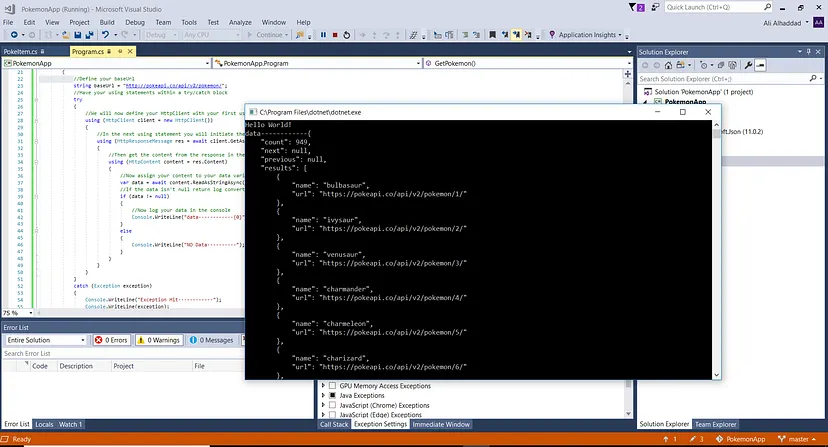
Now we will parse the data to a JObject, and retrieve the results property using bracket notation.
//Now define your asynchronous method which will retrieve all your pokemon.
public static async void GetPokemon()
{
    //Define your baseUrl
    string baseUrl = "http://pokeapi.co/api/v2/pokemon/";
    //Have your using statements within a try/catch block
    try
    {
        //We will now define your HttpClient with your first using statement which will implements a IDisposable interface.
        using (HttpClient client = new HttpClient())
        {
            //In the next using statement you will initiate the Get Request, use the await keyword so it will execute the using statement in order.
            using (HttpResponseMessage res = await client.GetAsync(baseUrl))
            {
                //Then get the content from the response in the next using statement, then within it you will get the data, and convert it to a c# object.
                using (HttpContent content = res.Content)
                {
                    //Now assign your content to your data variable, by converting into a string using the await keyword.
                    var data = await content.ReadAsStringAsync();
                    //If the data isn't null return log convert the data using newtonsoft JObject Parse class method on the data.
                    if (content != null)
                    {
                        //Now log your data object in the console
                        Console.WriteLine("data------------{0}", JObject.Parse(data)["results"]);
                    }
                    else
                    {
                        Console.WriteLine("NO Data----------");
                    }
                }
            }
        }
    }
    catch (Exception exception)
    {
        Console.WriteLine("Exception Hit------------");
        Console.WriteLine(exception);
    }
}
Feel free to look at github gist if you would like to look at the code.
Now we will define your GetOnePokemon method which would be also be static, meaning it would be a class method. Asynchronous since it is performing a call to a api. Then will be void since we are just logging the result into the console. We will define the method similarly to our GetPokemon method, but it take a pokeId argument, which would be use in your url to get a specific pokemon from api.
//Define your static method which will make the method become part of the class
//Also make it asynchronous meaning it is retrieving data from a api.
//Have it void since your are logging the result into the console.
//Which would take a integar as a argument.
public static async void GetOnePokemon(int pokeId)
{
    //Define your base url
    string baseURL = $"http://pokeapi.co/api/v2/pokemon/{pokeId}/";
    //Have your api call in try/catch block.
    try {
        //Now we will have our using directives which would have a HttpClient
        using (HttpClient client = new HttpClient())
        {
            //Now get your response from the client from get request to baseurl.
            //Use the await keyword since the get request is asynchronous, and want it run before next asychronous operation.
            using (HttpResponseMessage res = await client.GetAsync(baseURL))
            {
                //Now we will retrieve content from our response, which would be HttpContent, retrieve from the response Content property.
                using (HttpContent content = res.Content)
                {
                    //Retrieve the data from the content of the response, have the await keyword since it is asynchronous.
                    string data = await content.ReadAsStringAsync();
                    //If the data is not null, parse the data to a C# object, then create a new instance of PokeItem.
                    if (data != null)
                    {
                        //Parse your data into a object.
                        var dataObj = JObject.Parse(data);
                        //Then create a new instance of PokeItem, and string interpolate your name property to your JSON object.
                        //Which will convert it to a string, since each property value is a instance of JToken.
                        PokeItem pokeItem = new PokeItem(name: $"{dataObj["name"]}");
                        //Log your pokeItem's name to the Console.
                        Console.WriteLine("Pokemon Name: {0}", pokeItem.Name);
                    }
                    else
                    {
                        //If data is null log it into console.
                        Console.WriteLine("Data is null!");
                    }
                }
            }
        }
        //Catch any exceptions and log it into the console.
    } catch(Exception exception) {
        Console.WriteLine(exception);
    }
}
Feel free to look at github gist if you would like to look at the code.
The only other difference is that we are parsing our data to a JObject, then parsing our JObject name property which is a JToken using string interpolation. To our name parameter of our PokeItem constructor to create a new instance of our PokeItem class. Then we will log our pokeItem name to console.
Our console should look like this.
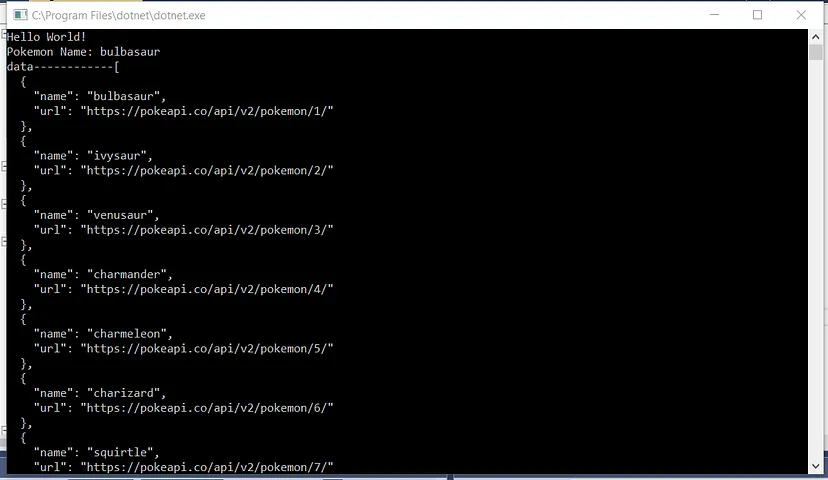
Congratulations your just fetched data using c#.
Here is my github repository for reference. Feel free to look gist if you would like to look at the code. Follow me on instagram and linkedin.
Instagram:
https://www.instagram.com/alooshie_97/
Linkedin:
https://www.linkedin.com/in/ali-alhaddad/
Happy Coding!